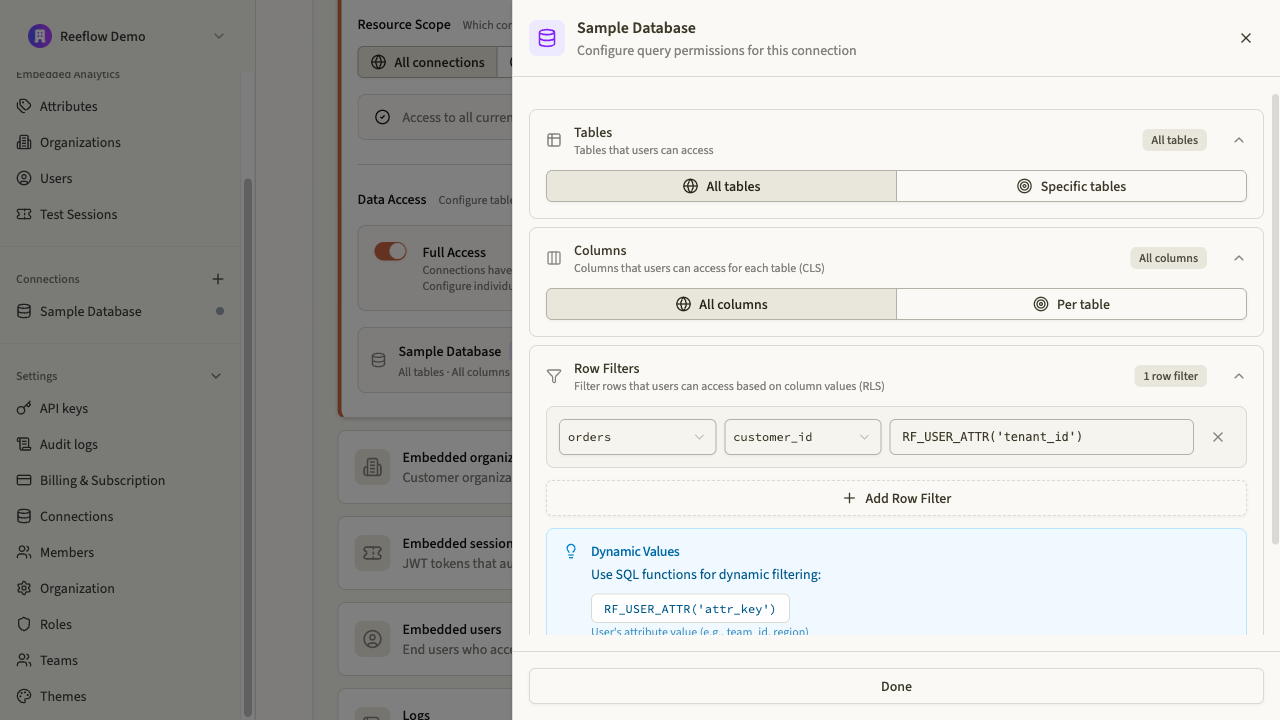
Row-level security (RLS) filters query results based on who is querying. Unlike connection and table security which gate access entirely, RLS shapes what data is returned by injecting filters into every query.
Row filters are defined as column-value pairs. When a query runs, Reeflow injects these filters as WHERE clauses, restricting results to rows that match the filter conditions.
For example, a filter tenant_id = RF_USER_ATTR('tenant_id') on the orders table transforms:
SELECT*FROM orders
Into:
SELECT*FROM orders WHERE tenant_id ='acme'
The value 'acme' comes from the principal’s tenant_id attribute, resolved at query time.
RF_USER_ATTR('attribute_name') resolves to the principal’s user attribute value at query time. This is what makes RLS dynamic: instead of hardcoding filter values, you reference attributes that are set when the session is created or configured on the user or role.
For example, tenant_id = RF_USER_ATTR('tenant_id') ensures each tenant only sees their own rows without creating separate roles for each tenant.